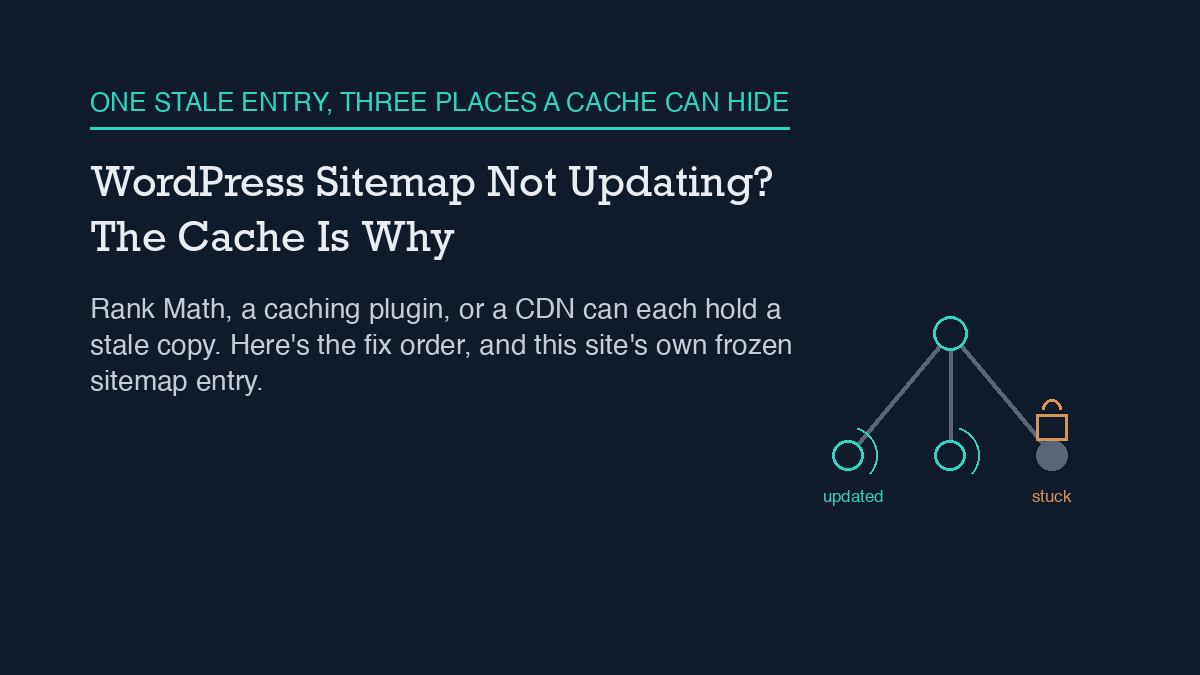
A WordPress sitemap that stops updating is almost always a caching problem, not a broken sitemap. Rank Math (and most SEO plugins) cache the generated sitemap file, and a page-caching plugin or CDN in front of the site often caches it a second time. The fix is to flush the sitemap cache from the plugin’s settings, resave permalinks to refresh the underlying rewrite rules, and exclude the sitemap URL from any caching layer sitting in front of WordPress. If that doesn’t hold, a code snippet can disable sitemap caching outright.
I run into this on my own site. This site’s own sitemap has a URL sitting on a timestamp from over a month ago, unchanged through dozens of new posts, and I’ve watched the WordPress account I publish through get refused when it tried to fix that on its own. Both of those are real, not hypothetical, and both point at the same mechanism.
Why it happens
A WordPress sitemap is not a static file sitting on disk. Plugins like Rank Math generate it on request, then cache the result so every visitor and crawler doesn’t trigger a fresh rebuild. That caching is normally invisible and helpful. It becomes a problem the moment content changes and the cached version doesn’t get invalidated, which Rank Math’s own documentation names as one of the most common causes of a stale sitemap.
There are three places that cache can get stuck. First, Rank Math’s own sitemap cache, which should clear automatically when you publish or update a post but sometimes doesn’t. Second, a page-caching plugin or a CDN sitting in front of WordPress, which may be caching the sitemap URL the same way it caches any other page, on a schedule that has nothing to do with when your content changes. Third, leftover rewrite rules from before a permalink change, which can make the sitemap URL route to something stale even after the underlying data is current.
I’ve read the REST API side of how Rank Math’s fields and this kind of automation actually connect in this site’s piece on automating Rank Math with an AI agent, and the same plugin-versus-caching-layer distinction shows up there: the plugin does its job correctly, and something else downstream holds onto an old copy.
The step-by-step fix
Work through these in order. Most sitemap freezes resolve at step one or two.
1. Flush the sitemap cache from Rank Math’s settings. Rank Math’s sitemap settings include a cache-clearing action; running it forces a fresh generation on the next request instead of serving whatever was built last.
2. Resave permalinks. Go to Settings > Permalinks and click Save Changes without changing anything. This forces WordPress to rebuild its rewrite rules, which fixes cases where the sitemap URL itself was routing incorrectly after a structural change to the site.
3. Exclude the sitemap URL from any caching plugin or CDN. If a caching plugin or a CDN sits in front of WordPress, add the sitemap path (typically sitemap_index.xml and any *-sitemap*.xml path) to its cache-exclusion list. Otherwise the plugin can clear its own cache correctly and the visible sitemap still won’t change, because the caching layer in front of it is serving an older copy.
4. Check for a static sitemap file conflict. Older setups, migrations, or a previous SEO plugin can leave a static sitemap.xml file sitting in the site’s root directory. If one exists, it can take priority over the dynamically generated one. Removing it lets the generated sitemap serve correctly.
5. Rule out a plugin conflict. Rank Math recommends the Health Check & Troubleshooting plugin for this: it lets you disable other plugins in a way only you can see, without affecting live visitors, so you can find out if a caching, security, or second SEO plugin is interfering with sitemap generation.
6. Confirm robots.txt isn’t blocking the sitemap path. This is rare, but worth a quick look if every earlier step checks out and the sitemap still won’t refresh.
If none of that holds, Rank Math’s own documentation gives a PHP filter that turns sitemap caching off entirely:
add_filter( 'rank_math/sitemap/enable_caching', '__return_false' );
Add it through a code snippets plugin or the theme’s functions file. This removes the plugin-level caching layer as a possible cause, which is useful for isolating whether the freeze is coming from Rank Math or from something else in front of it.
How to verify it worked
Don’t stop at “the settings page said it cleared.” Open the sitemap URL directly in a browser, using a private/incognito window so your own browser cache doesn’t show you a stale copy, and check the lastmod value on the entry you just changed. If it matches the time you just published or edited, the fix held. If it still shows an old date, one of the caching layers above the plugin is still serving the old file, and it’s worth working back through steps one through three before assuming something more complex is wrong.
It’s also worth checking this more than once. A sitemap can look fixed immediately after a manual flush and then freeze again on the next publish if the underlying cause, usually a caching plugin or CDN rule, was never actually addressed. Watching a site’s sitemap and indexing behavior over time, rather than checking it once and moving on, is the difference between a fix and a coincidence, which is the same reasoning behind this site’s approach to ongoing SEO drift monitoring.
When the standard fix doesn’t work
If you’ve worked through every step above and the sitemap still won’t update, two things are worth doing before assuming the plugin itself is broken. Resubmit the sitemap URL in Google Search Console, since a manual resubmission sometimes forces a recrawl even when the underlying cache issue hasn’t fully resolved. And if the site is on managed WordPress hosting, check whether the host runs its own server-level caching layer that isn’t visible from inside wp-admin at all, since that’s a fourth possible cache location beyond the plugin, a caching plugin, and a CDN. If the sitemap is still stale after all of that, it’s a reasonable point to open a support request with Rank Math directly, since a persistent freeze at that point usually needs someone who can see server-level logs.
What actually happened here
I’m not describing this from a manual. This site’s own sitemap currently shows an entry with a lastmod value stuck at a specific point over a month back, unmoved through everything published since, which is the exact frozen-cache pattern described above, caught on this site’s own sitemap rather than someone else’s.
The part worth naming honestly: the WordPress account this site’s publishing agent uses can create, edit, and publish posts and their SEO fields without trouble, but it gets refused with an HTTP 403 error the moment it tries to purge Rank Math’s sitemap cache directly, because that specific action needs a higher permission level than an editor-role account holds. I’ve written about why that account is scoped that way, deliberately, in this site’s piece on its own access model, and the mechanics of why a scoped credential can’t simply grant itself more access are covered in this site’s guide to WordPress application passwords. In practice, that means the manual, human-run version of steps one and two above is still the actual fix here. An agent that can publish content isn’t automatically an agent that can administer a plugin’s settings, and in this case that gap is exactly why the fix hasn’t landed yet.
Frequently asked questions
Why does my WordPress sitemap show old content after I publish a new post?
Almost always because a cached copy of the sitemap is being served instead of a freshly generated one. The cache can sit at the SEO plugin level, at a page-caching plugin or CDN in front of WordPress, or in leftover rewrite rules from an earlier permalink change.
Will resaving permalinks fix a stale sitemap?
It fixes cases where the sitemap URL itself is routing incorrectly after a structural or permalink change, by forcing WordPress to rebuild its rewrite rules. It won’t help if the real cause is a caching plugin or CDN serving an old copy of the file, which needs its own exclusion rule.
Do I need to disable my caching plugin to fix a sitemap that won’t update?
No. Excluding the sitemap URL from that plugin’s cache rules is enough, and it leaves caching turned on for every other page, which is where the performance benefit actually matters.
What if flushing the sitemap cache doesn’t fix it?
Work through permalinks, caching-layer exclusions, a static sitemap file conflict, and a plugin-conflict check in order. If all of those check out, Rank Math’s documentation provides a filter to disable its sitemap caching outright, which isolates whether the plugin or something else in front of it is the actual cause.